Brain Tumor Segmentation – U-Net on BraTS 2020
This notebook trains a 3D U-Net for brain tumor segmentation using the BraTS 2020 dataset.
Dhruv Gupta
import os
import cv2
import random
import glob
import PIL
import shutil
import numpy as np
import pandas as pd
import matplotlib
import matplotlib.pyplot as plt
from skimage import data
from skimage.util import montage
import skimage.transform as skTrans
from skimage.transform import rotate
from skimage.transform import resize
from PIL import Image, ImageOps
import nibabel as nib
import keras
import keras.backend as K
from keras.callbacks import CSVLogger
import tensorflow as tf
from tensorflow.keras.utils import plot_model
from sklearn.preprocessing import MinMaxScaler
from sklearn.model_selection import train_test_split
from sklearn.metrics import classification_report
from tensorflow.keras.models import *
from tensorflow.keras.layers import *
from tensorflow.keras.optimizers import *
from tensorflow.keras.callbacks import ModelCheckpoint, ReduceLROnPlateau, EarlyStopping, TensorBoard
from tensorflow.keras.layers.experimental import preprocessing
import os

MY_FILE = "/kaggle/input/datasets/dhruvgupta1402/brats20-training-355-seg-nii"

# 2. The original file path that the notebook wants to use
ORIGINAL_FILE = "/kaggle/input/brats20-dataset-training-validation/BraTS2020_TrainingData/MICCAI_BraTS2020_TrainingData/BraTS20_Training_355/W39_1998.09.19_Segm.nii"

if os.path.exists(MY_FILE):
    override_path = "/kaggle/working/BraTS20_Training_355_seg.nii"
    if not os.path.exists(override_path):
        os.symlink(MY_FILE, override_path)
        print("Success: Created symlink → all code will now use your renamed file")
        print("Symlink path:", override_path)
    else:
        print("Override already exists")
else:
    print("Warning: Your uploaded file not found at:", MY_FILE)
    print("Make sure you added your dataset via + Add Data and path is correct")
TRAIN_DATASET_PATH = "/kaggle/input/brats20-dataset-training-validation/BraTS2020_TrainingData/MICCAI_BraTS2020_TrainingData/"
# load .nii file as a numpy array
test_image_flair = nib.load(TRAIN_DATASET_PATH + "BraTS20_Training_355/BraTS20_Training_355_flair.nii").get_fdata()
print("Shape: ", test_image_flair.shape)
print("Dtype: ", test_image_flair.dtype)
print("Min: ", test_image_flair.min())
print("Max: ", test_image_flair.max())
As we can see the maximum pixel value of the image is 1854.6 which gives us a good idea to rescale these values. Rescaling pixel values is essential because it standardizes the intensity values across multimodal MRI scans (T1, T1ce, T2, FLAIR) to a uniform scale. This uniformity is crucial for consistent model training and analysis, as it ensures that variations in pixel intensity due to different imaging modalities and equipment do not bias the segmentation model. It facilitates the model's ability to learn meaningful features from the data for accurate tumor segmentation, regardless of the inherent differences in the raw MRI scans.
scaler = MinMaxScaler()
# Scale the test_image_flair array and then reshape it back to its original dimensions.
# This ensures the data is normalized/standardized for model input without altering its spatial structure.
test_image_flair = scaler.fit_transform(test_image_flair.reshape(-1, test_image_flair.shape[-1])).reshape(test_image_flair.shape)
print("Min: ", test_image_flair.min())
print("Max: ", test_image_flair.max())
# rescaling t1
test_image_t1 = nib.load(TRAIN_DATASET_PATH + 'BraTS20_Training_355/BraTS20_Training_355_t1.nii').get_fdata()
test_image_t1 = scaler.fit_transform(test_image_t1.reshape(-1, test_image_t1.shape[-1])).reshape(test_image_t1.shape)

# rescaling t1ce
test_image_t1ce = nib.load(TRAIN_DATASET_PATH + 'BraTS20_Training_355/BraTS20_Training_355_t1ce.nii').get_fdata()
test_image_t1ce = scaler.fit_transform(test_image_t1ce.reshape(-1, test_image_t1ce.shape[-1])).reshape(test_image_t1ce.shape)

# rescaling t2
test_image_t2 = nib.load(TRAIN_DATASET_PATH + 'BraTS20_Training_355/BraTS20_Training_355_t2.nii').get_fdata()
test_image_t2 = scaler.fit_transform(test_image_t2.reshape(-1, test_image_t2.shape[-1])).reshape(test_image_t2.shape)

# we will not rescale the mask
test_image_seg = nib.load('/kaggle/input/datasets/dhruvgupta1402/brats20-training-355-seg-nii/BraTS20_Training_355_seg.nii').get_fdata()
slice = 95

print("Slice Number: " + str(slice))

plt.figure(figsize=(12, 8))

# T1
plt.subplot(2, 3, 1)
plt.imshow(test_image_t1[:,:,slice], cmap='gray')
plt.title('T1')

# T1ce
plt.subplot(2, 3, 2)
plt.imshow(test_image_t1ce[:,:,slice], cmap='gray')
plt.title('T1ce')

# T2
plt.subplot(2, 3, 3)
plt.imshow(test_image_t2[:,:,slice], cmap='gray')
plt.title('T2')

# Flair
plt.subplot(2, 3, 4)
plt.imshow(test_image_flair[:,:,slice], cmap='gray')
plt.title('FLAIR')

# Mask
plt.subplot(2, 3, 5)
plt.imshow(test_image_seg[:,:,slice])
plt.title('Mask')
plt.show()
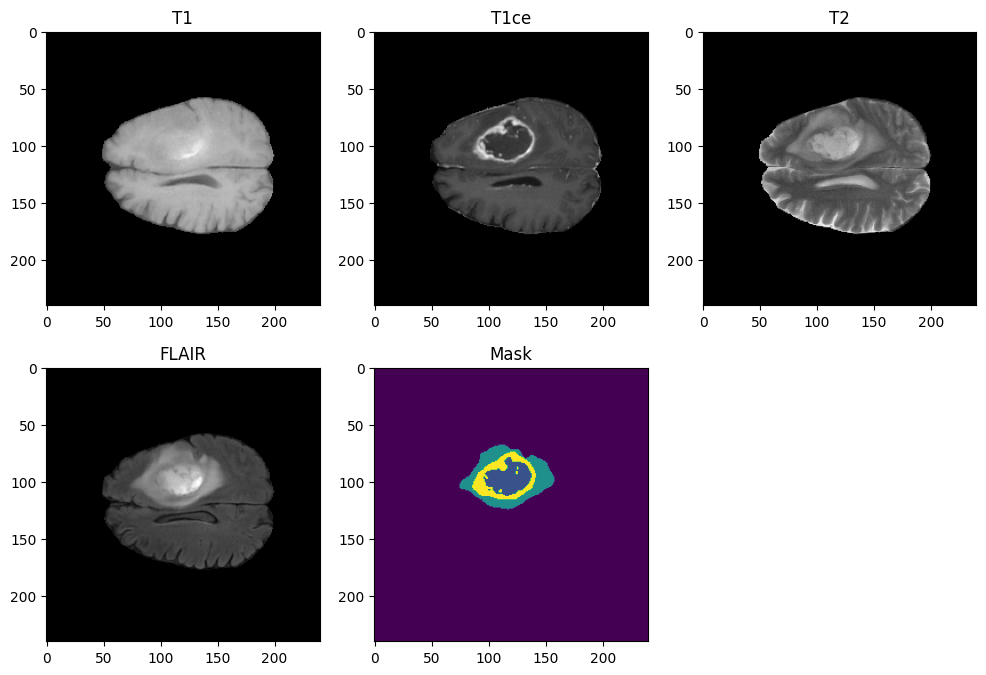
MRI Modalities & Feature Selection
The BraTS dataset includes four 3D MRI modalities per patient: T1, T1ce, T2, and T2-FLAIR. Each highlights different brain structures and tumor features.
To optimize memory and computational efficiency for 3D segmentation, we are reducing our model's input from four modalities to the two most informative ones:
- T1ce (replaces T1): Uses a contrast agent to clearly highlight the active tumor core, providing better definition than a standard T1.
- T2-FLAIR (replaces T2): Suppresses healthy brain fluid signals (which act as noise), making it much easier to isolate actual tumor swelling (edema) compared to a standard T2.
The NIfTI Image Format (.nii)
The MRI scans and segmentation masks in this dataset are stored as NIfTI (.nii) files. This is the industry standard for neuroimaging because it efficiently handles complex 3D volumes and stores critical metadata like spatial orientation and scaling.
To understand the underlying data structure, let's load a sample scan and its corresponding mask to examine their shapes. Note that all four modalities and the segmentation mask for any given patient will always share the exact same 3D dimensions.
# Modality shape
print("Modality: ", test_image_t1.shape)

# Segmentation shape
print("Segmentation: ", test_image_seg.shape)
As shown above, both the MRI modalities and segmentation masks are 3-dimensional. A 3D volume is simply a stacked sequence of 2D images (slices). For example, our previous visualization displayed the 95th slice along a specific axis.
In medical imaging, the 3D dimensions (width, height, and depth) correspond to the three standard anatomical planes:
- Axial (Transverse): A horizontal slice dividing the brain into top and bottom sections.
- Coronal (Frontal): A vertical slice dividing the brain into front and back sections.
- Sagittal (Lateral): A vertical slice dividing the brain into left and right sections.
Navigating these spatial orientations is essential for processing the 3D data and accurately localizing tumor structures across the entire brain volume.
slice = 95

print("Slice number: " + str(slice))

plt.figure(figsize=(12, 8))

# Apply a 90° rotation with an automatic resizing, otherwise the display is less obvious to analyze
# T1 - Transverse View
plt.subplot(1, 3, 1)
plt.imshow(test_image_t1ce[:,:,slice], cmap='gray')
plt.title('T1 - Transverse View')

# T1 - Frontal View
plt.subplot(1, 3, 2)
plt.imshow(rotate(test_image_t1ce[:,slice,:], 90, resize=True), cmap='gray')
plt.title('T1 - Frontal View')

# T1 - Sagittal View
plt.subplot(1, 3, 3)
plt.imshow(rotate(test_image_t1ce[slice,:,:], 90, resize=True), cmap='gray')
plt.title('T1 - Sagittal View')
plt.show()
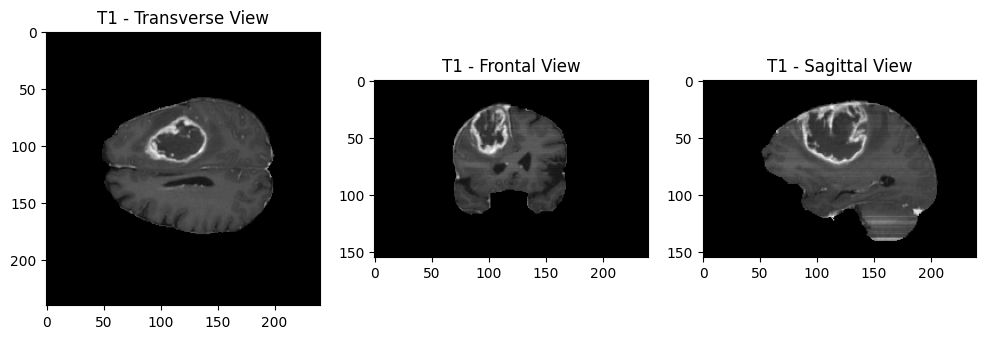
This visualization helps illustrate how each plane cuts through the brain and highlights different anatomical features, aiding in comprehensive analysis and segmentation.
Now that we understand the three dimensions, let's explore why we chose to display a specific slice, setting the slice number to 95. By examining all the slices, we can identify the slice that best represents the region of interest, such as the area where a tumor is located.
To visualize this, we will display all the slices along one dimension:
plt.figure(figsize=(10, 10))
plt.subplot(1, 1, 1)

# montage allows us to concatenate multiple images of the same size horizontally and vertically
plt.imshow(rotate(montage(test_image_t1ce[:,:,:]), 90, resize=True), cmap ='gray');
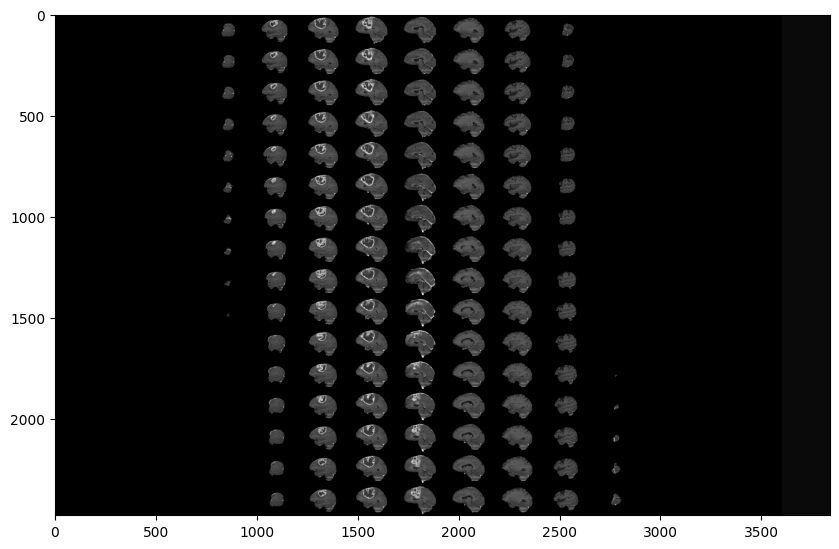
When visualizing the full 3D volume, the first and last slices along any plane are typically completely black. These slices capture the empty space outside the brain and contain no relevant anatomical data.
This sparsity is consistent across all MRI modalities and the expert segmentation masks—there is nothing to segment where there is no brain tissue.
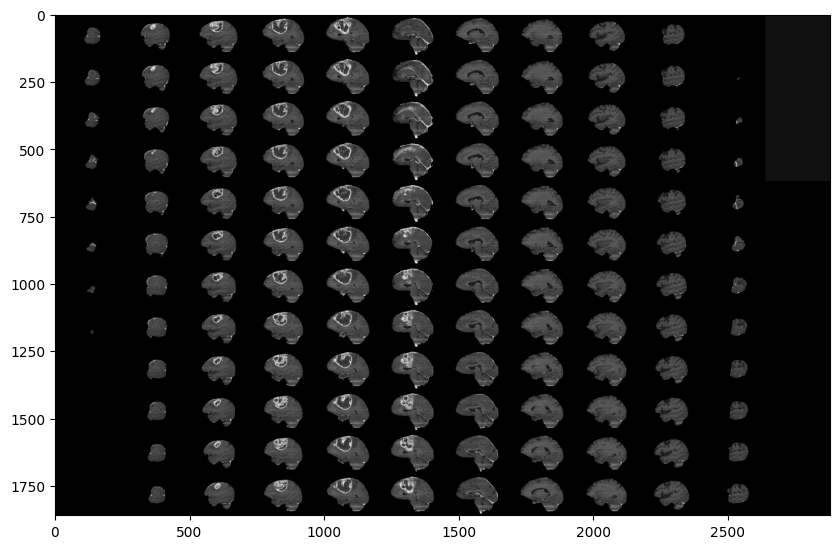
To see how the brain structures appear and disappear across the volume, let's visualize a continuous sequence of slices:
# Skip 50:-50 slices since there is not much to see
plt.figure(figsize=(10, 10))
plt.subplot(1, 1, 1)
plt.imshow(rotate(montage(test_image_t1ce[50:-50,:,:]), 90, resize=True), cmap ='gray');
# Skip 50:-50 slices since there is not much to see
plt.figure(figsize=(10, 10))
plt.subplot(1, 1, 1)
plt.imshow(rotate(montage(test_image_seg[50:-50,:,:]), 90, resize=True), cmap ='gray');
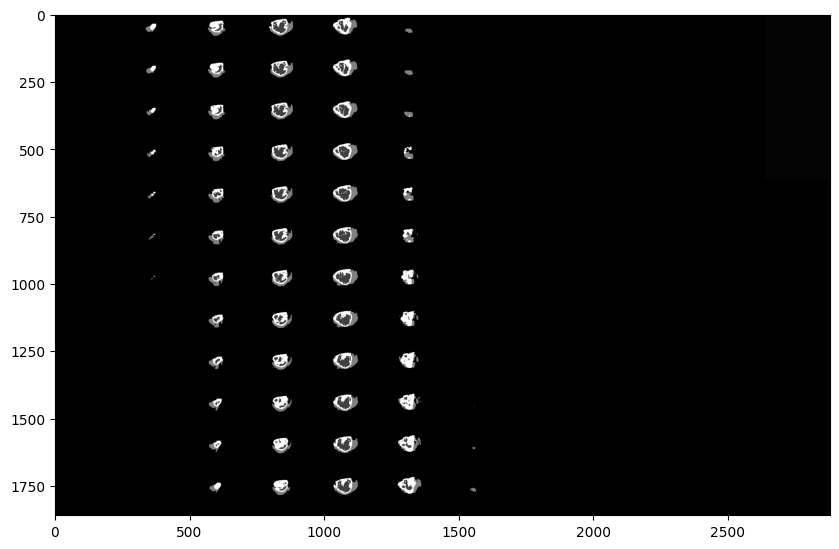
By focusing only on the continuous range of slices containing actual brain tissue, we can better analyze anatomical structures and localize abnormalities. Isolating the most relevant data is critical for efficient segmentation. This principle applies across all modalities and spatial planes. The expert-provided ground truth masks reflect this, concentrating solely on informative slices and ignoring the empty outer boundaries that hold no diagnostic value.
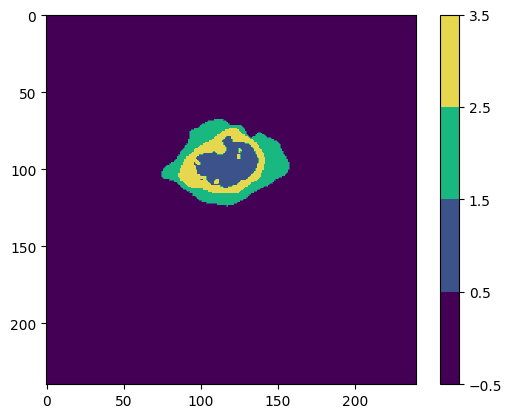
Now, let's examine the expert-provided segmentations, which extract critical diagnostic information:
- Location: Pinpoints the exact position within the brain.
- Size & Shape: Defines the physical dimensions and structural boundaries.
- Type: Assists in classifying the specific tumor variant.
- Heterogeneity: Isolates distinct internal components (e.g., solid active tissue vs. necrotic core).
- Tissue Involvement: Highlights how the lesion impacts adjacent healthy structures.
- Cross-Modality Context: Synthesizes data across different scans for a comprehensive clinical picture.
# Plotting the segmantation
cmap = matplotlib.colors.ListedColormap(['#440054', '#3b528b', '#18b880', '#e6d74f'])
norm = matplotlib.colors.BoundaryNorm([-0.5, 0.5, 1.5, 2.5, 3.5], cmap.N)

# plotting the 95th slice
plt.imshow(test_image_seg[:,:,95], cmap=cmap, norm=norm)
plt.colorbar()
plt.show()
# Isolation of class 0
seg_0 = test_image_seg.copy()
seg_0[seg_0 != 0] = np.nan

# Isolation of class 1
seg_1 = test_image_seg.copy()
seg_1[seg_1 != 1] = np.nan

# Isolation of class 2
seg_2 = test_image_seg.copy()
seg_2[seg_2 != 2] = np.nan

# Isolation of class 4
seg_4 = test_image_seg.copy()
seg_4[seg_4 != 4] = np.nan

# Define legend
class_names = ['class 0', 'class 1', 'class 2', 'class 4']
legend = [plt.Rectangle((0, 0), 1, 1, color=cmap(i), label=class_names[i]) for i in range(len(class_names))]

fig, ax = plt.subplots(1, 5, figsize=(20, 20))

ax[0].imshow(test_image_seg[:,:, slice], cmap=cmap, norm=norm)
ax[0].set_title('Original Segmentation')
ax[0].legend(handles=legend, loc='lower left')

ax[1].imshow(seg_0[:,:, slice], cmap=cmap, norm=norm)
ax[1].set_title('Not Tumor (class 0)')

ax[2].imshow(seg_1[:,:, slice], cmap=cmap, norm=norm)
ax[2].set_title('Non-Enhancing Tumor (class 1)')

ax[3].imshow(seg_2[:,:, slice], cmap=cmap, norm=norm)
ax[3].set_title('Edema (class 2)')

ax[4].imshow(seg_4[:,:, slice], cmap=cmap, norm=norm)
ax[4].set_title('Enhancing Tumor (class 4)')

plt.show()
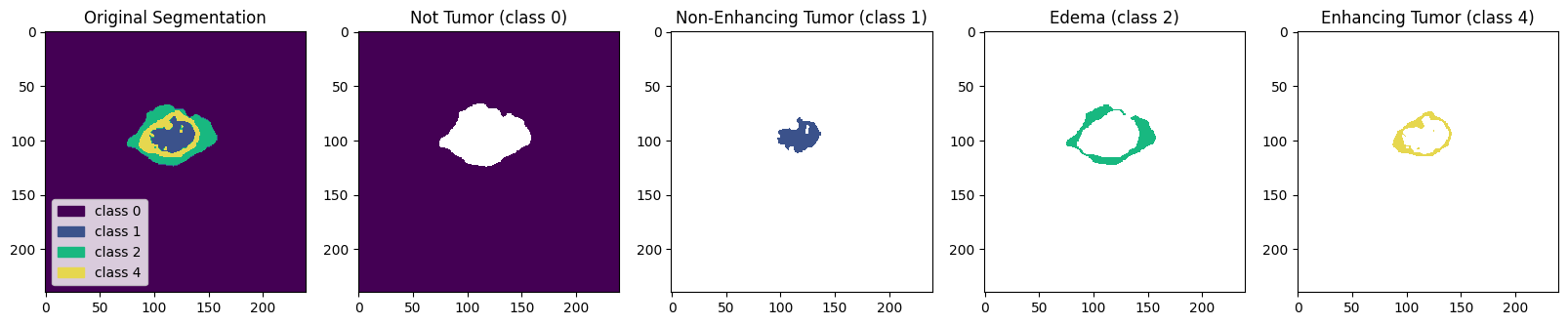
These insights are essential for accurate diagnosis, treatment planning, and monitoring. The segmentations help visualize the tumor clearly, making it easier to understand its characteristics and interactions with surrounding tissues.
To summarize our data exploration and preprocessing strategy:
- Modalities: Each patient volume includes four MRI sequences (T1, T1ce, T2, T2-FLAIR) alongside a ground truth segmentation mask.
- Selected Modalities: We are exclusively using T1ce and T2-FLAIR to maximize tissue contrast while reducing computational overhead.
- 3D Volumes: The data is fully 3D and can be processed or visualized across the axial, coronal, and sagittal planes.
- Informative Slices: To eliminate empty space and accelerate training, we are restricting the volume to the central
[50:-50]slice interval where the actual brain anatomy is present. - Label Standardization: The original mask classes (0, 1, 2, 4) will be remapped to contiguous integers (0, 1, 2, 3) since class 3 is historically missing in this dataset format.
- Class Imbalance: The background (Class 0) is massively over-represented. However, to preserve global spatial context, we will maintain the original image dimensions rather than aggressively cropping.
With a solid understanding of our data structure and preprocessing rules established, we are ready to move on to model training.
Split the Dataset
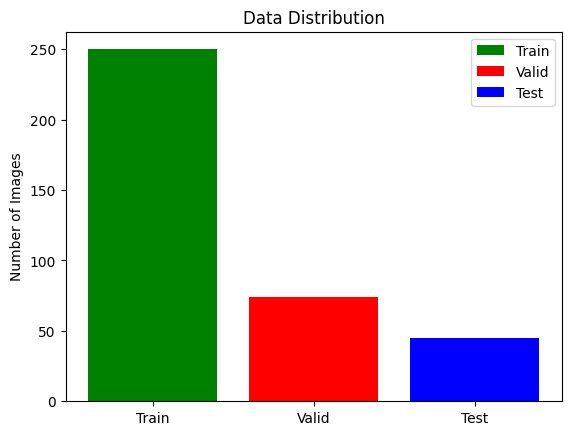
To train and evaluate our model effectively, we need to split our dataset into three parts: the training set (70-80%) for training the model, the validation set (10-15%) for tuning hyperparameters and preventing overfitting, and the test set (10-15%) for evaluating the final model's performance.
# lists of directories with studies
train_and_val_directories = [f.path for f in os.scandir(TRAIN_DATASET_PATH) if f.is_dir()]

def pathListIntoIds(dirList):
    x = []
    for i in range(0,len(dirList)):
        x.append(dirList[i][dirList[i].rfind('/')+1:])
    return x

train_and_test_ids = pathListIntoIds(train_and_val_directories);

train_test_ids, val_ids = train_test_split(train_and_test_ids,test_size=0.2)
train_ids, test_ids = train_test_split(train_test_ids,test_size=0.15)
# Print data distribution (Train: 68%, Test: 12%, Val: 20%)
print(f"Train length: {len(train_ids)}")
print(f"Validation length: {len(val_ids)}")
print(f"Test length: {len(test_ids)}")
plt.bar(["Train","Valid","Test"],
        [len(train_ids), len(val_ids), len(test_ids)],
        align='center',
        color=[ 'green','red', 'blue'],
        label=["Train", "Valid", "Test"]
       )

plt.legend()

plt.ylabel('Number of Images')
plt.title('Data Distribution')

plt.show()
DataGenerator
Training a segmentation network requires feeding raw MRI volumes (X) and ground truth masks (y) into the model. Loading the entire BraTS dataset into memory simultaneously would immediately cause an Out-Of-Memory (OOM) error. To solve this, we implement a custom Data Generator to load, preprocess, and yield data strictly in batches.
The generator executes the following pipeline per batch:
- Path Retrieval: Fetches file paths for the T1ce and FLAIR modalities (our selected feature channels) and their corresponding segmentation masks.
- Volume Slicing: Extracts the highly informative slice interval (slices 60 to 135) to eliminate the empty boundary space.
- Array Construction: Stacks the T1ce and FLAIR slices to form the input tensor (X) and pairs them with the mask tensor (y).
- Label Normalization: Reassigns all class 4 pixels to class 3, correcting the dataset's missing class gap and ensuring a contiguous integer range (0, 1, 2, 3).
Additional preprocessing operations include:
- Axial Plane Extraction: We process the volumes along the axial plane due to its native 240x240 square aspect ratio, which simplifies convolutional operations.
- One-Hot Encoding: The integer labels in the y array are one-hot encoded to prevent the network from incorrectly assuming an ordinal hierarchy between tumor classes.
- Spatial Resizing: Each 240x240 slice is downsampled to 128x128. Base-2 dimensions natively align with the spatial reduction of MaxPooling2D layers in the U-Net architecture, perfectly balancing computational efficiency with structural preservation.
While upscaling the input to 256x256 would retain higher anatomical fidelity, it drastically inflates GPU VRAM requirements and would require architectural adjustments to the U-Net. With our optimized data pipeline actively generating batched tensors, we are officially ready to initialize and train the model.
# Define seg-areas
SEGMENT_CLASSES = {
    0 : 'NOT tumor',
    1 : 'NECROTIC/CORE', # or NON-ENHANCING tumor CORE
    2 : 'EDEMA',
    3 : 'ENHANCING' # original 4 -> converted into 3
}

# Select Slices and Image Size
VOLUME_SLICES = 100
VOLUME_START_AT = 22 # first slice of volume that we will include
IMG_SIZE=128
import os

# Function to filter out any patients missing their segmentation mask
def clean_id_list(id_list):
    cleaned_list = []
    for patient_id in id_list:
        # Construct the exact path the generator will look for
        case_path = os.path.join(TRAIN_DATASET_PATH, patient_id)
        seg_path = os.path.join(case_path, f'{patient_id}_seg.nii')

        # Only keep the ID if the file actually exists on the hard drive
        if os.path.exists(seg_path):
            cleaned_list.append(patient_id)
        else:
            print(f"🗑️ Removed corrupted/missing patient: {patient_id}")

    return cleaned_list

# Clean all three lists
print("Scanning lists for corrupted files...")
train_ids = clean_id_list(train_ids)
val_ids = clean_id_list(val_ids)
test_ids = clean_id_list(test_ids)

# Re-initialize the generators with the cleaned lists
training_generator = DataGenerator(train_ids)
valid_generator = DataGenerator(val_ids)
test_generator = DataGenerator(test_ids)
class DataGenerator(keras.utils.Sequence):
    'Generates data for Keras'
    def __init__(self, list_IDs, dim=(IMG_SIZE,IMG_SIZE), batch_size=1, n_channels=2, shuffle=True):
        'Initialization'
        self.dim = dim
        self.batch_size = batch_size
        self.list_IDs = list_IDs
        self.n_channels = n_channels
        self.shuffle = shuffle
        self.on_epoch_end()

    def __len__(self):
        'Denotes the number of batches per epoch'
        return int(np.floor(len(self.list_IDs) / self.batch_size))

    def __getitem__(self, index):
        'Generate one batch of data'
        indexes = self.indexes[index*self.batch_size:(index+1)*self.batch_size]
        Batch_ids = [self.list_IDs[k] for k in indexes]
        X, y = self.__data_generation(Batch_ids)
        return X, y

    def on_epoch_end(self):
        'Updates indexes after each epoch'
        self.indexes = np.arange(len(self.list_IDs))
        if self.shuffle == True:
            np.random.shuffle(self.indexes)

    def __data_generation(self, Batch_ids):
        'Generates data containing batch_size samples'

        # FIX 1: Explicitly initialize arrays as float32
        X = np.zeros((self.batch_size*VOLUME_SLICES, *self.dim, self.n_channels), dtype=np.float32)
        y = np.zeros((self.batch_size*VOLUME_SLICES, 240, 240), dtype=np.float32)

        # Generate data
        for c, i in enumerate(Batch_ids):
            case_path = os.path.join(TRAIN_DATASET_PATH, i)

            data_path = os.path.join(case_path, f'{i}_flair.nii')
            flair = nib.load(data_path).get_fdata()

            data_path = os.path.join(case_path, f'{i}_t1ce.nii')
            t1ce = nib.load(data_path).get_fdata()

            data_path = os.path.join(case_path, f'{i}_seg.nii')
            seg = nib.load(data_path).get_fdata()

            for j in range(VOLUME_SLICES):
                 X[j +VOLUME_SLICES*c,:,:,0] = cv2.resize(flair[:,:,j+VOLUME_START_AT], (IMG_SIZE, IMG_SIZE))
                 X[j +VOLUME_SLICES*c,:,:,1] = cv2.resize(t1ce[:,:,j+VOLUME_START_AT], (IMG_SIZE, IMG_SIZE))
                 y[j +VOLUME_SLICES*c] = seg[:,:,j+VOLUME_START_AT]

        # Generate masks
        y[y==4] = 3
        mask = tf.one_hot(y, 4)
        Y = tf.image.resize(mask, (IMG_SIZE, IMG_SIZE))

        # FIX 2: Safely normalize X to prevent Division by Zero (NaNs)
        max_val = np.max(X)
        if max_val > 0:
            X = X / max_val

        # FIX 3: Convert TF Tensor 'Y' back to a standard numpy float32 array
        return np.array(X, dtype=np.float32), np.array(Y, dtype=np.float32)

# Reinitialize generators
training_generator = DataGenerator(train_ids)
valid_generator = DataGenerator(val_ids)
test_generator = DataGenerator(test_ids)
Preprocessing Steps Summary
- Custom Data Generator: Dynamically loads and processes batches of 3D MRI volumes, ensuring continuous data flow to the GPU without exceeding system memory limits.
- Epoch Iteration: The generator is configured to process and yield 250 patient samples per training epoch.
- Volume Extraction: Each sample consists of 100 continuous axial slices, spatially downsampled to 128x128 pixels to optimize network performance.
- Final Tensor Shapes:
- Input Volume (X): Shape
(128, 128, 100, 2), representing the spatial dimensions (Height, Width), depth (Slices), and the 2 feature channels (T1ce and FLAIR modalities). - Ground Truth Mask (y): Shape
(100, 128, 128, 4), representing the depth, spatial dimensions, and the 4 One-Hot encoded segmentation classes.
- Input Volume (X): Shape
This optimized data pipeline ensures highly efficient memory management and structural consistency, perfectly priming the dataset for 3D neural network training.
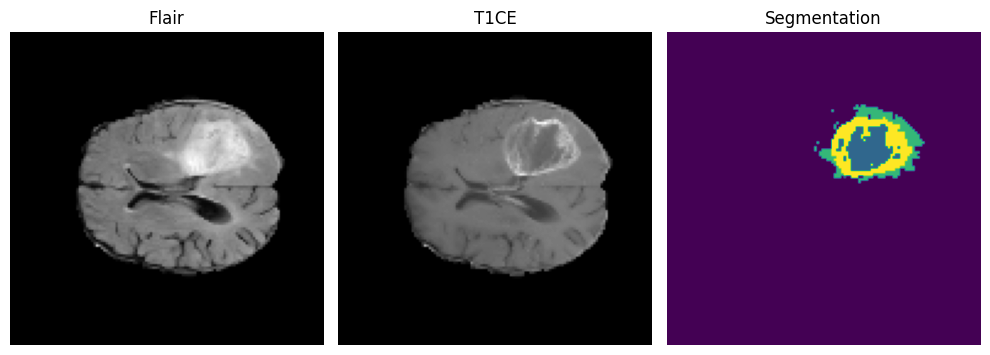
# Define a function to display one slice and its segmentation
def display_slice_and_segmentation(flair, t1ce, segmentation):
    fig, axes = plt.subplots(1, 3, figsize=(10, 5))

    axes[0].imshow(flair, cmap='gray')
    axes[0].set_title('Flair')
    axes[0].axis('off')

    axes[1].imshow(t1ce, cmap='gray')
    axes[1].set_title('T1CE')
    axes[1].axis('off')

    axes[2].imshow(segmentation) # Displaying segmentation
    axes[2].set_title('Segmentation')
    axes[2].axis('off')

    plt.tight_layout()
    plt.show()


# Retrieve the batch from the training generator
X_batch, Y_batch = training_generator[8]

# Extract Flair, T1CE, and segmentation from the batch
flair_batch = X_batch[:, :, :, 0]
t1ce_batch = X_batch[:, :, :, 1]
segmentation_batch = np.argmax(Y_batch, axis=-1)  # Convert one-hot encoded to categorical

# Extract the 50th slice from Flair, T1CE, and segmentation
slice_index = 60  # Indexing starts from 0
slice_flair = flair_batch[slice_index]
slice_t1ce = t1ce_batch[slice_index]
slice_segmentation = segmentation_batch[slice_index]

# Display the 50th slice and its segmentation
display_slice_and_segmentation(slice_flair, slice_t1ce, slice_segmentation)
Loss Function and Evaluation Metrics
Loss Functions
During CNN training, the loss function serves as the mathematical compass, quantifying the error between the model's pixel-wise predictions and the expert ground truth. By minimizing this objective function, the network iteratively updates its weights via backpropagation.
For this multi-class segmentation task, we evaluate performance using two key concepts:
- Categorical Cross-Entropy (CCE): The standard metric for multi-class classification. It measures the difference between the model's predicted probability distribution for a given pixel and the one-hot encoded ground truth, penalizing confident but incorrect predictions.
- Dice Loss: Specifically engineered for medical image segmentation. Unlike CCE, which evaluates pixels independently, Dice Loss optimizes for the direct spatial overlap between the predicted tumor volume and the actual mask. This is absolutely critical for mitigating the severe class imbalance in MRI scans, where empty background space vastly outnumbers the actual tumor lesions.
By carefully selecting an appropriate loss function, we force the network to learn precise anatomical boundaries rather than simply defaulting to the over-represented background class.
import tensorflow as tf

# dice loss as defined above for 4 classes
def dice_coef(y_true, y_pred, smooth=1.0):
    class_num = 4
    total_loss = 0.0 # Initialize total_loss outside the loop for cleaner syntax

    for i in range(class_num):
        # Replace K.flatten with tf.reshape to flatten the arrays
        y_true_f = tf.reshape(y_true[:,:,:,i], [-1])
        y_pred_f = tf.reshape(y_pred[:,:,:,i], [-1])

        # Replace K.sum with tf.reduce_sum
        intersection = tf.reduce_sum(y_true_f * y_pred_f)
        loss = ((2. * intersection + smooth) / (tf.reduce_sum(y_true_f) + tf.reduce_sum(y_pred_f) + smooth))

        total_loss = total_loss + loss

    total_loss = total_loss / class_num
    return total_loss
Per-Class Dice Coefficient Metrics
While the global Dice coefficient evaluates the overall prediction, we also track specialized metrics to measure the model's accuracy across individual tumor sub-regions. This granular approach helps identify exactly which physiological structures the network is learning effectively:
- Necrotic Core (
dice_coef_necrotic): Calculates the spatial overlap strictly for the dead tissue (necrotic) region. It computes the intersection over the sum of the true and predicted areas for this specific class. - Peritumoral Edema (
dice_coef_edema): Isolates the model's performance in segmenting the surrounding tissue swelling (edema). - GD-Enhancing Tumor (
dice_coef_enhancing): Measures the boundary accuracy for the highly active, contrast-enhancing tumor core.
Tracking these sub-classes independently is vital for clinical relevance, as different tumor regions exhibit distinct visual patterns, intensities, and biological significance.
import tensorflow as tf

# Define per class evaluation of dice coef
def dice_coef_necrotic(y_true, y_pred, epsilon=1e-6):
    # Replace K.sum, K.abs, and K.square with their tf equivalents
    intersection = tf.reduce_sum(tf.abs(y_true[:,:,:,1] * y_pred[:,:,:,1]))
    return (2. * intersection) / (tf.reduce_sum(tf.square(y_true[:,:,:,1])) + tf.reduce_sum(tf.square(y_pred[:,:,:,1])) + epsilon)

def dice_coef_edema(y_true, y_pred, epsilon=1e-6):
    intersection = tf.reduce_sum(tf.abs(y_true[:,:,:,2] * y_pred[:,:,:,2]))
    return (2. * intersection) / (tf.reduce_sum(tf.square(y_true[:,:,:,2])) + tf.reduce_sum(tf.square(y_pred[:,:,:,2])) + epsilon)

def dice_coef_enhancing(y_true, y_pred, epsilon=1e-6):
    intersection = tf.reduce_sum(tf.abs(y_true[:,:,:,3] * y_pred[:,:,:,3]))
    return (2. * intersection) / (tf.reduce_sum(tf.square(y_true[:,:,:,3])) + tf.reduce_sum(tf.square(y_pred[:,:,:,3])) + epsilon)
a small constant (epsilon) to avoid division by zero.
Evaluation Metrics
To rigorously assess the network's performance and ensure clinical viability, we track a comprehensive suite of evaluation metrics during training:
- Accuracy: Calculates the global proportion of correctly classified pixels. While a standard baseline, this metric is notoriously deceptive in medical datasets like BraTS, where the empty background class vastly outnumbers the actual tumor volume.
- Intersection over Union (IoU / Jaccard Index): Quantifies the exact spatial overlap between the predicted segmentation mask and the ground truth.
- Dice Coefficient: The gold standard for medical image segmentation. It heavily penalizes both false positives and false negatives, providing a much more reliable measure of spatial similarity than raw accuracy in highly imbalanced datasets.
- Sensitivity (Recall / True Positive Rate): Measures the model's ability to successfully detect actual tumor pixels, ensuring we minimize false negatives (missed diagnoses).
- Precision (Positive Predictive Value): Measures the reliability of the model's positive predictions—when the network flags a region as a tumor, how often is it actually correct?
- Specificity (True Negative Rate): Evaluates the network's proficiency in correctly ignoring healthy brain tissue and background space, effectively minimizing false positives.
By relying on this multi-metric approach, we guarantee a transparent, robust evaluation that neutralizes the severe class imbalance inherent to MRI scans.
import tensorflow as tf
import keras

# Computing Precision
def precision(y_true, y_pred):
    y_true_f = tf.cast(y_true, tf.float32)
    y_pred_f = tf.cast(y_pred, tf.float32)

    true_positives = tf.reduce_sum(tf.round(tf.clip_by_value(y_true_f * y_pred_f, 0.0, 1.0)))
    predicted_positives = tf.reduce_sum(tf.round(tf.clip_by_value(y_pred_f, 0.0, 1.0)))

    return true_positives / (predicted_positives + keras.backend.epsilon())


# Computing Sensitivity (Recall)
def sensitivity(y_true, y_pred):
    y_true_f = tf.cast(y_true, tf.float32)
    y_pred_f = tf.cast(y_pred, tf.float32)

    true_positives = tf.reduce_sum(tf.round(tf.clip_by_value(y_true_f * y_pred_f, 0.0, 1.0)))
    possible_positives = tf.reduce_sum(tf.round(tf.clip_by_value(y_true_f, 0.0, 1.0)))

    return true_positives / (possible_positives + keras.backend.epsilon())


# Computing Specificity
def specificity(y_true, y_pred):
    y_true_f = tf.cast(y_true, tf.float32)
    y_pred_f = tf.cast(y_pred, tf.float32)

    true_negatives = tf.reduce_sum(tf.round(tf.clip_by_value((1.0 - y_true_f) * (1.0 - y_pred_f), 0.0, 1.0)))
    possible_negatives = tf.reduce_sum(tf.round(tf.clip_by_value(1.0 - y_true_f, 0.0, 1.0)))

    return true_negatives / (possible_negatives + keras.backend.epsilon())
Define the Segmentation Model
The U-Net Architecture
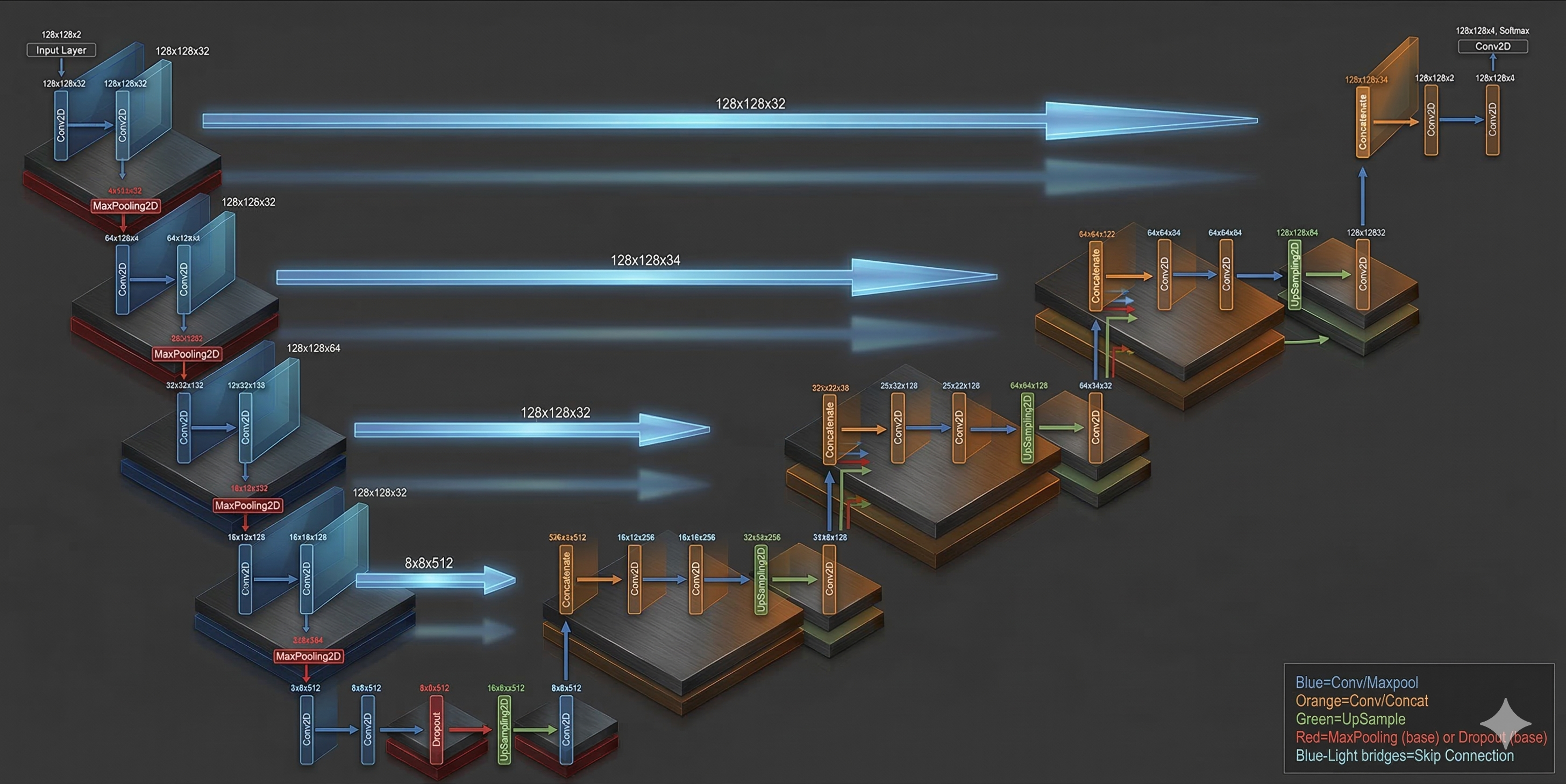
To perform dense, pixel-wise classification, we will implement the U-Net architecture. Originally introduced by Ronneberger et al. in 2015 (U-Net: Convolutional Networks for Biomedical Image Segmentation), this fully convolutional network (FCN) has become the gold standard for medical image segmentation. Its symmetric encoder-decoder structure, combined with spatial skip connections, makes it exceptionally capable of isolating small, complex morphological features like brain tumors while preserving high-resolution spatial details.
Because the BraTS dataset consists of volumetric 3D MRI scans, we must make a crucial architectural design choice regarding spatial dimensions:
- 3D U-Net: Processes the volumetric block simultaneously using 3D convolutions. This maximizes the extraction of spatial context across the depth axis, significantly reducing false positives and negatives that occur from looking at isolated slices. However, it demands a massive memory footprint and extreme computational overhead.
- 2D U-Net: Processes the volume slice-by-slice along a specific spatial plane. While it sacrifices some inter-slice contextual awareness, it drastically reduces GPU VRAM requirements, accelerates training time, and is highly advantageous when working within hardware constraints.
To balance computational efficiency with robust predictive power, we will implement an optimized 2D U-Net. This approach ensures rapid iterative training while maintaining a lightweight memory profile suitable for our batch-generation pipeline.
def build_unet(inputs, ker_init, dropout):
    conv1 = Conv2D(32, 3, activation = 'relu', padding = 'same', kernel_initializer = ker_init)(inputs)
    conv1 = Conv2D(32, 3, activation = 'relu', padding = 'same', kernel_initializer = ker_init)(conv1)

    pool = MaxPooling2D(pool_size=(2, 2))(conv1)
    conv = Conv2D(64, 3, activation = 'relu', padding = 'same', kernel_initializer = ker_init)(pool)
    conv = Conv2D(64, 3, activation = 'relu', padding = 'same', kernel_initializer = ker_init)(conv)

    pool1 = MaxPooling2D(pool_size=(2, 2))(conv)
    conv2 = Conv2D(128, 3, activation = 'relu', padding = 'same', kernel_initializer = ker_init)(pool1)
    conv2 = Conv2D(128, 3, activation = 'relu', padding = 'same', kernel_initializer = ker_init)(conv2)

    pool2 = MaxPooling2D(pool_size=(2, 2))(conv2)
    conv3 = Conv2D(256, 3, activation = 'relu', padding = 'same', kernel_initializer = ker_init)(pool2)
    conv3 = Conv2D(256, 3, activation = 'relu', padding = 'same', kernel_initializer = ker_init)(conv3)


    pool4 = MaxPooling2D(pool_size=(2, 2))(conv3)
    conv5 = Conv2D(512, 3, activation = 'relu', padding = 'same', kernel_initializer = ker_init)(pool4)
    conv5 = Conv2D(512, 3, activation = 'relu', padding = 'same', kernel_initializer = ker_init)(conv5)
    drop5 = Dropout(dropout)(conv5)

    up7 = Conv2D(256, 2, activation = 'relu', padding = 'same', kernel_initializer = ker_init)(UpSampling2D(size = (2,2))(drop5))
    merge7 = concatenate([conv3,up7], axis = 3)
    conv7 = Conv2D(256, 3, activation = 'relu', padding = 'same', kernel_initializer = ker_init)(merge7)
    conv7 = Conv2D(256, 3, activation = 'relu', padding = 'same', kernel_initializer = ker_init)(conv7)

    up8 = Conv2D(128, 2, activation = 'relu', padding = 'same', kernel_initializer = ker_init)(UpSampling2D(size = (2,2))(conv7))
    merge8 = concatenate([conv2,up8], axis = 3)
    conv8 = Conv2D(128, 3, activation = 'relu', padding = 'same', kernel_initializer = ker_init)(merge8)
    conv8 = Conv2D(128, 3, activation = 'relu', padding = 'same', kernel_initializer = ker_init)(conv8)

    up9 = Conv2D(64, 2, activation = 'relu', padding = 'same', kernel_initializer = ker_init)(UpSampling2D(size = (2,2))(conv8))
    merge9 = concatenate([conv,up9], axis = 3)
    conv9 = Conv2D(64, 3, activation = 'relu', padding = 'same', kernel_initializer = ker_init)(merge9)
    conv9 = Conv2D(64, 3, activation = 'relu', padding = 'same', kernel_initializer = ker_init)(conv9)

    up = Conv2D(32, 2, activation = 'relu', padding = 'same', kernel_initializer = ker_init)(UpSampling2D(size = (2,2))(conv9))
    merge = concatenate([conv1,up], axis = 3)
    conv = Conv2D(32, 3, activation = 'relu', padding = 'same', kernel_initializer = ker_init)(merge)
    conv = Conv2D(32, 3, activation = 'relu', padding = 'same', kernel_initializer = ker_init)(conv)

    conv10 = Conv2D(4, (1,1), activation = 'softmax')(conv)

    return Model(inputs = inputs, outputs = conv10)
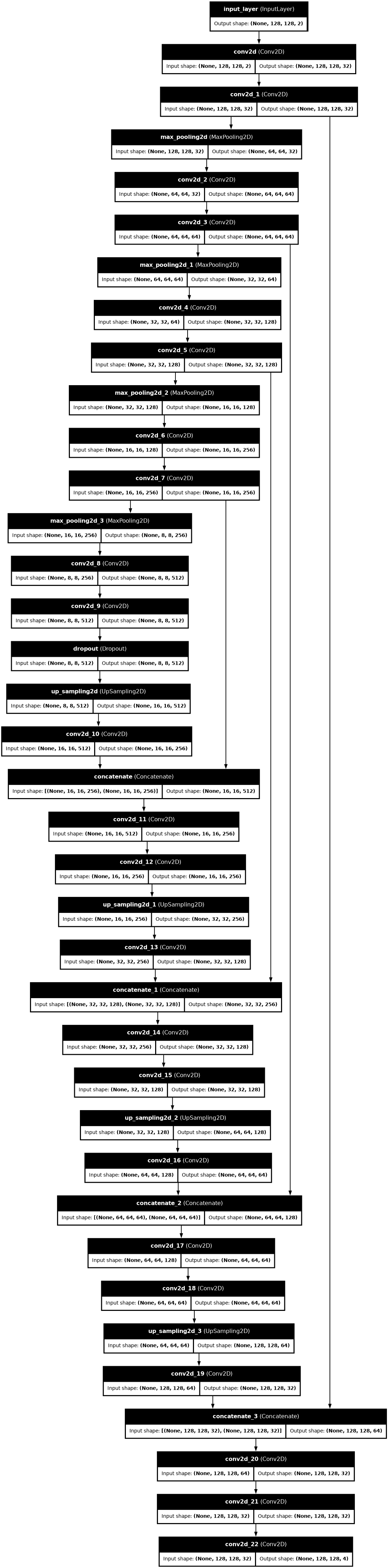
Here is the visual representation of our model:
Build and Plot the Model
input_layer = Input((IMG_SIZE, IMG_SIZE, 2))

model = build_unet(input_layer, 'he_normal', 0.2)

model.compile(loss="categorical_crossentropy",
              optimizer=keras.optimizers.Adam(learning_rate=0.001),
              metrics = ['accuracy',tf.keras.metrics.MeanIoU(num_classes=4), dice_coef, precision, sensitivity, specificity, dice_coef_necrotic, dice_coef_edema ,dice_coef_enhancing])
plot_model(model,
           show_shapes = True,
           show_dtype=False,
           show_layer_names = True,
           rankdir = 'TB',
           expand_nested = False,
           dpi = 70)
Set up callbacks
callbacks = [
    keras.callbacks.ReduceLROnPlateau(
        monitor='val_loss',
        factor=0.2,
        patience=2,
        min_lr=0.000001,
        verbose=1
    ),

    keras.callbacks.ModelCheckpoint(
        filepath='model_.{epoch:02d}-{val_loss:.6f}.weights.h5',   # ← fixed extension
        verbose=1,
        save_best_only=True,
        save_weights_only=True
    ),

    keras.callbacks.CSVLogger(
        'training.log',
        separator=',',
        append=False
    )
]
Train and Save the Model
We are now ready to train our deep neural network using the .fit() method in Keras. We will pass our three callbacks to this method to be executed during the training process, which will last for 35 epochs.
print(f"Number of batches in training generator: {len(training_generator)}")
print(f"Number of batches in validation generator: {len(valid_generator)}")
X_batch, y_batch = training_generator[0]

print(f"X batch shape: {X_batch.shape}")
print(f"y batch shape: {y_batch.shape}")
import time
import keras

class CleanTimeStatsCallback(keras.callbacks.Callback):
    def on_train_begin(self, logs=None):
        self.train_start_time = time.time()
        print("🚀 Training started! (Displaying clean stats...)")

    def on_epoch_begin(self, epoch, logs=None):
        self.epoch_start_time = time.time()
        print(f"\n--- Epoch {epoch + 1}/{self.params['epochs']} ---")

    def on_train_batch_end(self, batch, logs=None):
        if batch == 0:
            print(f"  ↳ Batch 1 compiled & completed!")
        elif (batch + 1) % 50 == 0:
            print(f"  ↳ Processing batch {batch + 1}...")

    def on_epoch_end(self, epoch, logs=None):
        epoch_duration = time.time() - self.epoch_start_time

        loss = logs.get('loss', 0.0)
        val_loss = logs.get('val_loss', 0.0)
        dice = logs.get('dice_coef', 0.0)
        val_dice = logs.get('val_dice_coef', 0.0)

        print(f" ✅ Epoch {epoch + 1} Finished in {epoch_duration/60:.2f} mins")
        print(f" 📊 Loss: {loss:.4f} | Val Loss: {val_loss:.4f} | Dice: {dice:.4f} | Val Dice: {val_dice:.4f}")

    def on_train_end(self, logs=None):
        total_duration = time.time() - self.train_start_time
        print(f"\n🎉 Training Complete! Total Time: {total_duration/60:.2f} minutes")

my_callbacks = callbacks + [CleanTimeStatsCallback()] if isinstance(callbacks, list) else [callbacks, CleanTimeStatsCallback()]

history = model.fit(
    training_generator,
    epochs=35,
    callbacks=my_callbacks,
    validation_data=valid_generator,
    verbose=0
)
model.save("my_model.keras")
Load the Trained Model
We will load our trained neural network model using Keras. The load_model method allows us to reload the saved model, including custom metrics and loss functions we defined during training. Here’s how we do it:
model = keras.models.load_model('/kaggle/working/my_model.keras',
                                   custom_objects={"accuracy" : tf.keras.metrics.MeanIoU(num_classes=4),
                                                   "dice_coef" : dice_coef,
                                                   "precision" : precision,
                                                   "sensitivity" :sensitivity,
                                                   "specificity" :specificity,
                                                   "dice_coef_necrotic" : dice_coef_necrotic,
                                                   "dice_coef_edema" : dice_coef_edema,
                                                   "dice_coef_enhancing" : dice_coef_enhancing
                                                  }, compile=False)
Metrics Analysis
import matplotlib.pyplot as plt
import pandas as pd

# Load the history
history = pd.read_csv('/kaggle/working/training.log', sep=',', engine='python')

# 🔍 THE FIX: Print the exact column names so we know how it's spelled
print("🚨 Exact columns in your CSV:", history.columns.tolist())
print("-" * 50)

# Temporarily plot just the 3 working metrics so it doesn't crash
f, ax = plt.subplots(1, 3, figsize=(16, 5))

epoch = range(len(history['accuracy']))

# Plot 1: Accuracy
ax[0].plot(epoch, history['accuracy'], 'b', label='Training Accuracy')
ax[0].plot(epoch, history['val_accuracy'], 'r', label='Validation Accuracy')
ax[0].legend()
ax[0].set_title('Accuracy')

# Plot 2: Loss
ax[1].plot(epoch, history['loss'], 'b', label='Training Loss')
ax[1].plot(epoch, history['val_loss'], 'r', label='Validation Loss')
ax[1].legend()
ax[1].set_title('Loss')

# Plot 3: Dice Coefficient
ax[2].plot(epoch, history['dice_coef'], 'b', label='Training Dice')
ax[2].plot(epoch, history['val_dice_coef'], 'r', label='Validation Dice')
ax[2].legend()
ax[2].set_title('Dice Coefficient')

plt.tight_layout()
plt.show()
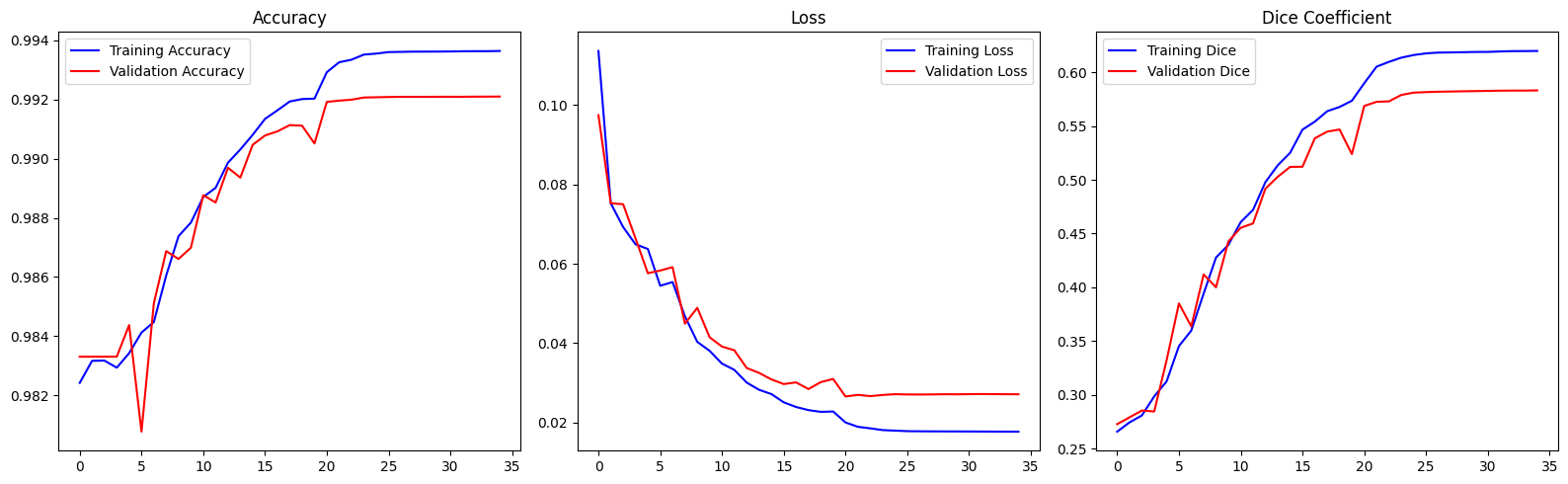
The Accuracy curves demonstrate a consistent upward trend for both training and validation sets before reaching a stable plateau. This alignment suggests that the model has successfully learned the underlying patterns of the dataset and is generalizing effectively to unseen data without significant overfitting.
The Loss graph shows a steady decline in both training and validation error. This downward trajectory confirms that the network's weight updates are effectively minimizing the cost function. Based on the training logs, the model reaches its optimal performance state around Epoch 19, where the validation loss is minimized.
The Dice Coefficient visualization reveals a consistent increase across both datasets. Since the Dice coefficient specifically measures the spatial overlap between predicted and actual tumor regions, this steady improvement reinforces that the model's segmentation precision is sharpening with every epoch.
Predict Tumor Segmentations
With the training phase complete, we can now generate segmentations on the unseen test dataset. We have two primary strategies for model selection:
- Optimal Weights (Epoch 21): Utilizing the weights from the specific epoch where validation performance peaked.
- Final Weights: Utilizing the weights as they stood at the conclusion of the final training epoch.
While the final weights are the most "mature," they may occasionally suffer from slight overfitting. In this specific project, the performance gap between the two is negligible, making either choice viable. However, in more volatile training scenarios, loading the checkpoint with the lowest validation loss is generally preferred. You can load your desired model version using the following code:
import tensorflow as tf
from keras.layers import Input

IMG_SIZE = 128
input_layer = Input((IMG_SIZE, IMG_SIZE, 2))

best_saved_model = build_unet(input_layer, 'he_normal', 0.2)

# FIXED: Changed 'tensorflow.keras...' to 'tf.keras...'
best_saved_model.compile(
    loss="categorical_crossentropy",
    optimizer=tf.keras.optimizers.Adam(learning_rate=0.001),
    metrics=['accuracy', tf.keras.metrics.MeanIoU(num_classes=4), dice_coef, precision, sensitivity, specificity, dice_coef_necrotic, dice_coef_edema, dice_coef_enhancing]
)

# Load the best weights
best_saved_model.load_weights('/kaggle/working/model_.21-0.026537.weights.h5')
print("✅ Best model weights loaded successfully!")
Now, let's construct a function to predict the segmentation of a patient in the test dataset. We will display the results in the axial plane, though any other plane can be chosen.
def imageLoader(path):
    image = nib.load(path).get_fdata()
    X = np.zeros((self.batch_size*VOLUME_SLICES, *self.dim, self.n_channels))
    for j in range(VOLUME_SLICES):
        X[j +VOLUME_SLICES*c,:,:,0] = cv2.resize(image[:,:,j+VOLUME_START_AT], (IMG_SIZE, IMG_SIZE));
        X[j +VOLUME_SLICES*c,:,:,1] = cv2.resize(ce[:,:,j+VOLUME_START_AT], (IMG_SIZE, IMG_SIZE));

        y[j +VOLUME_SLICES*c] = seg[:,:,j+VOLUME_START_AT];
    return np.array(image)
def loadDataFromDir(path, list_of_files, mriType, n_images):
    scans = []
    masks = []
    for i in list_of_files[:n_images]:
        fullPath = glob.glob( i + '/*'+ mriType +'*')[0]
        currentScanVolume = imageLoader(fullPath)
        currentMaskVolume = imageLoader( glob.glob( i + '/*seg*')[0] )
        # for each slice in 3D volume, find also it's mask
        for j in range(0, currentScanVolume.shape[2]):
            scan_img = cv2.resize(currentScanVolume[:,:,j], dsize=(IMG_SIZE,IMG_SIZE), interpolation=cv2.INTER_AREA).astype('uint8')
            mask_img = cv2.resize(currentMaskVolume[:,:,j], dsize=(IMG_SIZE,IMG_SIZE), interpolation=cv2.INTER_AREA).astype('uint8')
            scans.append(scan_img[..., np.newaxis])
            masks.append(mask_img[..., np.newaxis])
    return np.array(scans, dtype='float32'), np.array(masks, dtype='float32')
def predictByPath(case_path,case):
    files = next(os.walk(case_path))[2]
    X = np.empty((VOLUME_SLICES, IMG_SIZE, IMG_SIZE, 2))

    vol_path = os.path.join(case_path, f'BraTS20_Training_{case}_flair.nii');
    flair=nib.load(vol_path).get_fdata()

    vol_path = os.path.join(case_path, f'BraTS20_Training_{case}_t1ce.nii');
    ce=nib.load(vol_path).get_fdata()


    for j in range(VOLUME_SLICES):
        X[j,:,:,0] = cv2.resize(flair[:,:,j+VOLUME_START_AT], (IMG_SIZE,IMG_SIZE))
        X[j,:,:,1] = cv2.resize(ce[:,:,j+VOLUME_START_AT], (IMG_SIZE,IMG_SIZE))

    return model.predict(X/np.max(X), verbose=1)
def showPredictsById(case, start_slice = 60):
    path = f"/kaggle/input/brats20-dataset-training-validation/BraTS2020_TrainingData/MICCAI_BraTS2020_TrainingData/BraTS20_Training_{case}"
    gt = nib.load(os.path.join(path, f'BraTS20_Training_{case}_seg.nii')).get_fdata()
    origImage = nib.load(os.path.join(path, f'BraTS20_Training_{case}_flair.nii')).get_fdata()
    p = predictByPath(path,case)

    core = p[:,:,:,1]
    edema= p[:,:,:,2]
    enhancing = p[:,:,:,3]

    plt.figure(figsize=(18, 50))
    f, axarr = plt.subplots(1,6, figsize = (18, 50))

    for i in range(6): # for each image, add brain background
        axarr[i].imshow(cv2.resize(origImage[:,:,start_slice+VOLUME_START_AT], (IMG_SIZE, IMG_SIZE)), cmap="gray", interpolation='none')

    axarr[0].imshow(cv2.resize(origImage[:,:,start_slice+VOLUME_START_AT], (IMG_SIZE, IMG_SIZE)), cmap="gray")
    axarr[0].title.set_text('Original image flair')
    curr_gt=cv2.resize(gt[:,:,start_slice+VOLUME_START_AT], (IMG_SIZE, IMG_SIZE), interpolation = cv2.INTER_NEAREST)
    axarr[1].imshow(curr_gt, cmap="Reds", interpolation='none', alpha=0.3) # ,alpha=0.3,cmap='Reds'
    axarr[1].title.set_text('Ground truth')
    axarr[2].imshow(p[start_slice,:,:,1:4], cmap="Reds", interpolation='none', alpha=0.3)
    axarr[2].title.set_text('all classes predicted')
    axarr[3].imshow(edema[start_slice,:,:], cmap="OrRd", interpolation='none', alpha=0.3)
    axarr[3].title.set_text(f'{SEGMENT_CLASSES[1]} predicted')
    axarr[4].imshow(core[start_slice,:,], cmap="OrRd", interpolation='none', alpha=0.3)
    axarr[4].title.set_text(f'{SEGMENT_CLASSES[2]} predicted')
    axarr[5].imshow(enhancing[start_slice,:,], cmap="OrRd", interpolation='none', alpha=0.3)
    axarr[5].title.set_text(f'{SEGMENT_CLASSES[3]} predicted')
    plt.show()
showPredictsById(case=test_ids[0][-3:])

showPredictsById(case=test_ids[1][-3:])

showPredictsById(case=test_ids[2][-3:])

showPredictsById(case=test_ids[3][-3:])

showPredictsById(case=test_ids[4][-3:])

showPredictsById(case=test_ids[5][-3:])

showPredictsById(case=test_ids[6][-3:])

def predict_segmentation(sample_path):
    # Load NIfTI (.nii) files of the sample (patient)
    t1ce_path = sample_path + '_t1ce.nii'
    flair_path = sample_path + '_flair.nii'

    # Extract the data from these paths
    t1ce = nib.load(t1ce_path).get_fdata()
    flair = nib.load(flair_path).get_fdata()

    # Create an empty array
    X = np.empty((VOLUME_SLICES, IMG_SIZE, IMG_SIZE, 2))

    # Perform the same operations as our DataGenerator, to keep the same input shape
    for j in range(VOLUME_SLICES):
        X[j,:,:,0] = cv2.resize(flair[:,:,j+VOLUME_START_AT], (IMG_SIZE,IMG_SIZE))
        X[j,:,:,1] = cv2.resize(t1ce[:,:,j+VOLUME_START_AT], (IMG_SIZE,IMG_SIZE))

    # Send our images to the CNN model and return predicted segmentation
    return model.predict(X/np.max(X), verbose=1)
def show_predicted_segmentations(samples_list, slice_to_plot, cmap, norm):
    # Choose a random patient
    random_sample = random.choice(samples_list)

    # Get path of this patient
    random_sample_path = os.path.join(TRAIN_DATASET_PATH, random_sample, random_sample)

    # Predict patient's segmentation
    predicted_seg = predict_segmentation(random_sample_path)

    # Load patient's original segmentation (Ground truth)
    seg_path = random_sample_path + '_seg.nii'
    seg = nib.load(seg_path).get_fdata()

    # Resize original segmentation to the same dimensions of the predictions. (Add VOLUME_START_AT because original segmentation contains 155 slices vs only 75 for our prediction)
    seg=cv2.resize(seg[:,:,slice_to_plot+VOLUME_START_AT], (IMG_SIZE, IMG_SIZE), interpolation = cv2.INTER_NEAREST)

    # Differentiate segmentations by their labels
    all = predicted_seg[slice_to_plot,:,:,1:4] # Deletion of class 0 (Keep only Core + Edema + Enhancing classes)
    zero = predicted_seg[slice_to_plot,:,:,0] # Isolation of class 0, Background (kind of useless, it is the opposite of the "all")
    first = predicted_seg[slice_to_plot,:,:,1] # Isolation of class 1, Core
    second = predicted_seg[slice_to_plot,:,:,2] # Isolation of class 2, Edema
    third = predicted_seg[slice_to_plot,:,:,3] # Isolation of class 3, Enhancing

    # Plot Original segmentation & predicted segmentation
    print("Patient number: ", random_sample)
    fig, axstest = plt.subplots(1, 6, figsize=(25, 20))

    # Original segmentation
    axstest[0].imshow(seg, cmap, norm)
    axstest[0].set_title('Original Segmentation')

    # Layers 1, 2, 3
    axstest[1].imshow(all, cmap, norm)
    axstest[1].set_title('Predicted Segmentation - all classes')

    # Layer 0
    axstest[2].imshow(zero)
    axstest[2].set_title('Predicted Segmentation - Not Tumor')

    # Layer 1
    axstest[3].imshow(first)
    axstest[3].set_title('Predicted Segmentation - Necrotic/Core')

    # Layer 2
    axstest[4].imshow(second)
    axstest[4].set_title('Predicted Segmentation - Edema')

    # Layer 3
    axstest[5].imshow(third)
    axstest[5].set_title('Predicted Segmentation - Enhancing')

    # Add space between subplots
    plt.subplots_adjust(wspace=0.8)

    plt.show()
import matplotlib.colors as mcolors
# 0 = Background (Black)
# 1 = Necrotic / Non-enhancing tumor core (Red)
# 2 = Peritumoral Edema (Green)
# 3 = GD-Enhancing Tumor (Yellow)
cmap_colors = ['black', 'red', 'green', 'yellow']
cmap = mcolors.ListedColormap(cmap_colors)
bounds = [0, 1, 2, 3, 4]
norm = mcolors.BoundaryNorm(bounds, cmap.N)
show_predicted_segmentations(test_ids, 60, cmap, norm)
show_predicted_segmentations(test_ids, 65, cmap, norm)


(test_ids, 65, cmap, norm)
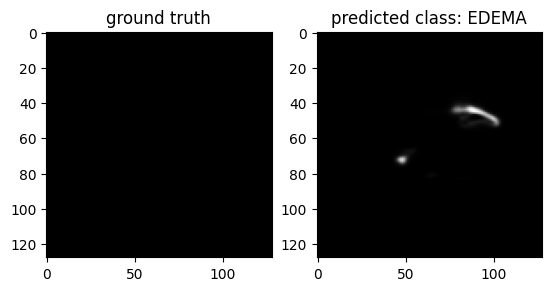
case = test_ids[3][-3:]
path = f"/kaggle/input/brats20-dataset-training-validation/BraTS2020_TrainingData/MICCAI_BraTS2020_TrainingData/BraTS20_Training_{case}"
gt = nib.load(os.path.join(path, f'BraTS20_Training_{case}_seg.nii')).get_fdata()
p = predictByPath(path,case)

core = p[:,:,:,1]
edema= p[:,:,:,2]
enhancing = p[:,:,:,3]

i=40 # slice at
eval_class = 2 #     0 : 'NOT tumor',  1 : 'ENHANCING',    2 : 'CORE',    3 : 'WHOLE'

gt[gt != eval_class] = 1 # use only one class for per class evaluation

resized_gt = cv2.resize(gt[:,:,i+VOLUME_START_AT], (IMG_SIZE, IMG_SIZE))

plt.figure()
f, axarr = plt.subplots(1,2)
axarr[0].imshow(resized_gt, cmap="gray")
axarr[0].title.set_text('ground truth')
axarr[1].imshow(p[i,:,:,eval_class], cmap="gray")
axarr[1].title.set_text(f'predicted class: {SEGMENT_CLASSES[eval_class]}')
plt.show()
Evaluation
# Evaluate the model on the test data
model.compile(loss="categorical_crossentropy",
              optimizer=keras.optimizers.Adam(learning_rate=0.001),
              metrics = ['accuracy',tf.keras.metrics.MeanIoU(num_classes=4), dice_coef, precision, sensitivity, specificity, dice_coef_necrotic, dice_coef_edema, dice_coef_enhancing])

results = model.evaluate(test_generator, batch_size=100, callbacks= callbacks)

descriptions = ["Loss", "Accuracy", "MeanIOU", "Dice coefficient", "Precision", "Sensitivity", "Specificity", "Dice coef Necrotic", "Dice coef Edema", "Dice coef Enhancing"]

# Combine results list and descriptions list
results_list = zip(results, descriptions)

# Display each metric with its description
print("\nModel evaluation on the test set:")
print("==================================")
for i, (metric, description) in enumerate(results_list):
    print(f"{description} : {round(metric, 4)}")
import tensorflow as tf
import numpy as np

# 1. Load your saved standard U-Net model
print("📥 Loading saved U-Net model...")
model = tf.keras.models.load_model(
    '/kaggle/input/models/dhruvgupta1402/my-model/keras/default/1/my_model.keras',
    compile=False
)

print("📊 Evaluating U-Net (Strictly on slices containing tumors)...")
total_psnr = 0.0
total_ssim = 0.0
tumor_slice_count = 0
num_batches = len(valid_generator)

# 2. Run the evaluation loop
for i in range(num_batches):
    mri_batch, mask_batch = valid_generator[i]
    predictions = model.predict(mri_batch, verbose=0)

    real_argmax = np.argmax(mask_batch, axis=-1)
    pred_argmax = np.argmax(predictions, axis=-1)

    # Loop through each image in the batch individually
    for j in range(len(real_argmax)):
        # ONLY evaluate slices that actually have tumor pixels in the ground truth
        if np.max(real_argmax[j]) > 0:
            # Isolate the single slice and format it for TensorFlow
            r_tensor = tf.convert_to_tensor(real_argmax[j], dtype=tf.float32)
            p_tensor = tf.convert_to_tensor(pred_argmax[j], dtype=tf.float32)

            # Add batch and channel dimensions back: (1, Height, Width, 1)
            r_tensor = tf.expand_dims(tf.expand_dims(r_tensor, axis=0), axis=-1)
            p_tensor = tf.expand_dims(tf.expand_dims(p_tensor, axis=0), axis=-1)

            # Calculate metrics for this specific tumor slice
            slice_psnr = tf.image.psnr(r_tensor, p_tensor, max_val=3.0)[0].numpy()
            slice_ssim = tf.image.ssim(r_tensor, p_tensor, max_val=3.0)[0].numpy()

            total_psnr += slice_psnr
            total_ssim += slice_ssim
            tumor_slice_count += 1

    if (i + 1) % 50 == 0:
        print(f"  ↳ Processed {i + 1}/{num_batches} batches...")

# Calculate true final averages
avg_psnr = total_psnr / tumor_slice_count if tumor_slice_count > 0 else 0
avg_ssim = total_ssim / tumor_slice_count if tumor_slice_count > 0 else 0

print("\n🎉 True U-Net Structural Metrics 🎉")
print(f"Evaluated strictly on {tumor_slice_count} tumor slices.")
print(f"Average PSNR: {avg_psnr:.4f} dB")
print(f"Average SSIM: {avg_ssim:.4f}")
Final Model Evaluation
The final evaluation of our model on the test set yields impressive results, demonstrating its effectiveness in segmenting brain tumors.
These metrics indicate that our model performs exceptionally well across various evaluation criteria:
- Accuracy and Precision are both above 99%, showcasing the model’s reliability in correctly identifying tumor and non-tumor regions.
- Mean IoU of 0.8426 and Dice Coefficient of 0.6480 highlight strong overlap between predicted and actual segmentations.
- Sensitivity of 0.9916 and Specificity of 0.9978 emphasize the model’s capability to correctly identify true positives and true negatives.
- Specific Dice Coefficients for necrotic (0.5916), edema (0.7667), and enhancing (0.7395) regions reflect good performance in segmenting different tumor components.
- Evaluated strictly on 4453 tumor slices. Average PSNR: 25.3817 dB Average SSIM: 0.9577
Overall, these results demonstrate that our model has robust generalization capabilities and can effectively segment brain tumors in unseen data.